

Data Migration from Legacy Systems: Risks, Checklist, and What Really Causes Failure
Data migration from legacy systems rarely fails because of the technical pipeline. It fails because of what was already wrong with the data before anyone started moving it.
A migration project can have a flawless ETL design, a well-tested target schema, and a competent team, and still produce a system nobody trusts — because the duplicates, missing fields, and inconsistent formats that lived quietly in the old system get carried over intact into the new one.
This is the gap most migration planning misses. Teams budget time for data extraction, transformation logic, and testing the new platform. They rarely budget equivalent time for understanding what is actually wrong with the data they are about to move.
As a result, problems that took years to accumulate are faithfully reproduced in a system that was supposed to fix them.
This guide covers what makes legacy data migration different from a routine system upgrade, the risks that actually cause projects to stall or fail, a practical checklist to run before migrating, and what a deduplication and reconciliation approach looks like in practice — illustrated by a real migration that consolidated 17 separate systems into one trusted reference.
What Makes Legacy System Migration Different
A legacy system, in practical terms, is an IT system — often an ERP, a mainframe, or a database running on platforms like IBM AS/400 or Db2 — that still does its job but can no longer be upgraded or easily connected to newer tools.
Organizations keep relying on legacy systems because replacing them is disruptive. But that reliance means years of data accumulate inside them with whatever quality standards were in place at the time — standards that are rarely documented and rarely consistent.
This is what separates legacy migration from migrating between two modern, well-documented systems. A modern-to-modern move usually has clear schemas on both ends and reasonable assumptions about data quality. A legacy migration usually does not.
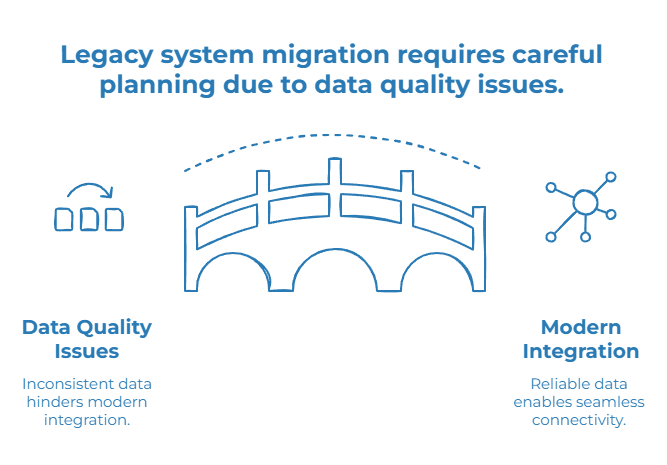
The source system was built, patched, and extended over years or decades, often by people no longer at the company. The data inside it reflects every process change, every merger, and every workaround that happened along the way.
The practical consequence is that connectivity itself becomes a constraint. Modern ETL tools are built around modern data sources — cloud databases, REST APIs, well-documented schemas. Legacy platforms like AS/400 and Db2 often require dedicated connectors just to read the data reliably, before any quality work can even begin.
A migration plan that assumes standard connectivity will work on a legacy source is usually making the first assumption that breaks.
Why Data Migration Risks Are Mostly Data Risks, Not Technical Risks
Most migration risk frameworks focus on technical failure points: incomplete extraction, broken transformations, downtime during cutover. Those risks are real, but they are also the ones teams plan for by default.
The risks that actually derail projects tend to be data quality risks.
Common Data Migration Risks
The most damaging data migration risks are often invisible at first. They do not always trigger a failed job or an obvious error message. They surface later, when teams start using the new system and realize that the underlying data cannot be trusted.
- Duplicate records multiply on arrival. A supplier or customer that existed under three slightly different names in the old system does not merge automatically just because it landed in a new database. It becomes three records in a system that was supposed to be cleaner.
- Silent data loss happens in unmapped fields. Legacy systems often contain fields nobody currently uses but that still hold business-relevant history. If the migration mapping does not account for them, that history disappears without anyone noticing until it is needed.
- Inconsistent formats break downstream logic. A date stored as text in one place and as a structured value in another can “migrate successfully” in a technical sense, while quietly breaking every report or rule that depends on consistent formatting.
- No one fully understands the source data anymore. The institutional knowledge of why certain fields exist or what certain codes mean often left with the people who built or maintained the legacy system.
- Business rules were never documented. Logic that lived in one analyst’s head — for example, “this status code means inactive” — has no formal definition to migrate alongside the data itself.
- Reconciliation happens too late. Checking whether source and target match is often left until after cutover, when fixing a discrepancy means touching a system already in production.
None of these show up as a failed migration job. They show up months later, as a report that does not reconcile or a process that quietly stopped working.
Migrating Data vs. Migrating Systems
These two are often planned as the same project, but they are not the same problem.
Migrating systems is an infrastructure exercise: standing up the new platform, configuring it, and connecting it to what it needs to connect to.
Migrating data is a quality exercise: deciding what counts as a valid record, resolving duplicates, reconciling fields, and making sure what lands in the new system is something people can actually trust.
A technically successful system cutover with uncorrected data is not a successful migration. It is a faster, more expensive way to keep the same problems — now harder to fix because they are embedded in a system everyone assumes is clean.
Legacy Data Migration vs. ETL Migration
ETL tools are built to move and transform data from one system to another. That is a different job from making sure the data being moved is accurate, deduplicated, complete, and trusted.
A pipeline can extract, transform, and load every record from a legacy source flawlessly, and still load three versions of the same customer, a date field nobody can parse consistently, and a tax ID that was wrong in the source to begin with.
ETL can move data from one system to another. It does not guarantee that the data being moved is accurate, deduplicated, complete, or trusted.
That guarantee requires a data quality layer working alongside the transformation logic, not instead of it — with profiling, matching, validation, and reconciliation applied before or during the move, not assumed because the pipeline ran successfully.
Data Migration Examples from Legacy Systems
The same underlying challenge shows up across several common scenarios:
- Legacy CRM to modern CRM — consolidating customer records that have drifted across years of manual entry and regional variations.
- AS/400 or Db2 to a modern database — moving off mainframe-era infrastructure while preserving decades of accumulated business data.
- ERP migration — reconciling supplier, product, and financial master data that several modules have touched independently over time.
- Migration to Microsoft Dynamics or a similar modern platform — often the trigger that finally surfaces years of uncorrected source data.
- Consolidating multiple CRM or ERP systems into a single golden record — the scenario at the center of the CCI Paris Île-de-France case study below.
- Migration to a data warehouse or cloud analytics platform — where inconsistent source formats become immediately visible once dashboards depend on them.
These examples all point to the same reality: the technical destination may change, but the quality of the source data determines whether the migration creates trust or simply relocates existing problems.
How to Know If a Data Migration Actually Succeeded
A migration that completes on schedule is not necessarily a migration that worked. A few indicators tend to reveal the real outcome:
- Duplicate rate after cutover. If the same entity still appears multiple times in the new system, the migration moved the data without resolving its underlying quality.
- Reconciliation gaps. Differences between source and target record counts that cannot be explained usually point to silent data loss during mapping, not a clean transfer.
- Time to first “this number looks wrong” report. A new system that gets challenged within weeks of going live is a strong signal that uncorrected source issues made the trip along with the data.
- Manual correction volume post-migration. If teams are still fixing the same categories of errors months after cutover, the migration addressed infrastructure but not data quality.
These signals matter because a migration project is usually judged complete the moment the technical cutover succeeds — long before anyone can tell whether the data inside is actually trustworthy.
Data Migration Risk Checklist
A quick way to assess exposure before migrating:
- Have source records been profiled for duplicates before mapping begins?
- Are all critical fields mapped, including ones rarely used but still business-relevant?
- Are format inconsistencies such as dates, identifiers, and currencies identified across source systems?
- Is there a defined process for merging duplicate records rather than carrying all of them over?
- Can every migrated record be traced back to its original source for audit purposes?
- Is there a rollback or reconciliation plan if discrepancies surface after cutover?
- Are business teams — not just IT — involved in defining what a “correct” record looks like?
- Is data quality validated after migration, not just assumed because the technical job completed?
If several of these answers are unclear, the migration risk is not only technical. It is a sign that data quality issues may be carried into the new system without being resolved.
→ Not sure your source data is ready to migrate? Run a Flash Audit before mapping starts.
How to Approach Data Migration from Legacy Systems
A migration that holds up combines four practices, applied before the technical cutover rather than after.
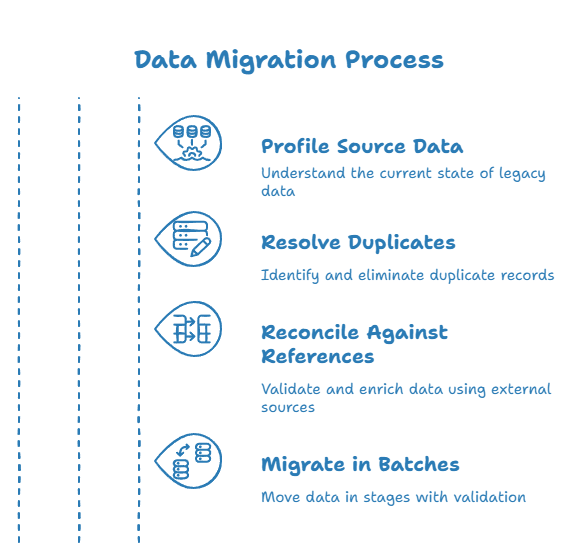
Profile Before Mapping
Understanding the actual state of source data — duplicates, missing fields, inconsistent formats — has to happen before field mapping is finalized, not discovered mid-migration.
Profiling helps teams see what is really inside the legacy system before deciding how data should move into the target platform.
Resolve Duplicates at the Source
Fuzzy and full-text matching can identify records that refer to the same entity even when names, formatting, or word order differ. This catches matches that a simple exact-match rule would miss.
The goal is not just to move every record. It is to decide which records deserve to become trusted records in the new system.
Reconcile Against Authoritative References
External registries such as tax identifiers, address databases, or national business registries can validate and enrich records during migration, rather than carrying forward whatever was in the legacy system unchecked.
Migrate in Controlled, Traceable Batches
Moving data in stages, with validation between each batch, makes it possible to catch problems early rather than discovering them after the full cutover.
Traceability matters here: every migrated record should be explainable after the move, not simply assumed to be correct.
In Practice: Consolidating 17 CRM Systems into One Golden Record
The Paris Île-de-France Chamber of Commerce and Industry ran a three-year project to consolidate 17 separate CRM systems into a single trusted reference, or golden record, as part of a broader reorganization.
The scale of sources, fields, and formats involved was a significant source of complexity for the team. Cleansing, formatting, deduplication, and enrichment were industrialized into repeatable, programmable workflows.
The project included fuzzy and full-text matching to align records across systems despite differing origins, as well as direct use of national reference registries to validate and update records during the consolidation.
This case shows that a successful migration is not only about moving data from one system to another. It is about consolidating, deduplicating, enriching, and tracing the data before it becomes the foundation of the new system.
Legacy Migration Software: What to Look For
Not every data tool handles legacy sources well. Mainframe and AS/400-era systems in particular require specific connectivity that general-purpose ETL tools do not always cover out of the box.
The capabilities that matter most are:
- Native connectivity to legacy databases, including IBM Db2 and AS/400, not just modern cloud databases.
- Fuzzy and full-text matching to catch duplicates that exact-match rules miss, especially when legacy naming conventions are inconsistent.
- Data profiling before mapping, so the actual state of source data is known before field mapping decisions are locked in.
- Reconciliation against authoritative registries to validate and enrich records during migration rather than after.
- Batch-based, traceable migration with validation checkpoints, rather than a single all-or-nothing cutover.
- No-code rule management, so business teams can define what a valid or duplicate record looks like without waiting on a development backlog.
- Audit trail and record lineage, so each migrated record can be explained after cutover.
- Post-migration monitoring, so data quality does not immediately degrade again once the new system goes live.
Without profiling, matching, reconciliation, and lineage built in, a migration tool can move data efficiently while moving every existing data quality problem along with it.
Where Tale of Data Fits
Tale of Data connects directly to legacy sources — including IBM Db2 and AS/400 — alongside modern databases, files, and cloud platforms, so migration does not start with a connectivity workaround.
Concretely, that means profiling source data to surface duplicates, missing fields, and inconsistent formats before migration mapping is finalized; resolving duplicates through fuzzy and full-text matching that catches near-identical records exact-match rules would miss; reconciling records against external reference data, including national business registries, to validate and enrich them during the move; and migrating in controlled, traceable batches with a full audit trail.
The platform does not replace the target system. Tale of Data is the data quality and control layer between legacy sources and the target system — the one that decides what actually deserves to make the move.
Conclusion
A legacy migration is not successful because the data has moved. It is successful when the new system starts with cleaner, reconciled, traceable data than the old one.
For organizations replacing legacy systems, modernizing infrastructure, or consolidating multiple applications, the most important question is not only “Can we migrate the data?” It is: “Can we trust the data once it arrives?”
Not Sure How Clean Your Source Data Actually Is Before Migrating?
Request a free Flash Audit to identify duplicates, inconsistent formats, unmapped fields, and data quality risks in your legacy systems before migration.
If you want to go further, start a free trial and test profiling, deduplication, and reconciliation on your own data.

SAP Data Migration: Steps, Tools and Key Risks

Data Quality Management SAP: S/4HANA Migration Guide